서론
SPA에서 상태 관리를 이야기하면 React의 useState, Context, Zustand 같은 도구를 먼저 떠올리기 쉽습니다.
이러한 도구를 보다 정확히 이해하기 위해서는 왜 이러한 개념이 등장했는지, 도구를 사용하기 전에는 어떻게 구현해야 했는지 등을 알아야 한다고 생각합니다.
이번 글에서는 바닐라 자바스크립트를 사용해 기존 방식에서 SPA 방식으로 구현하는 예제를 살펴보고, 한계를 확인해보도록 하겠습니다.
요구사항

타입에 맞는 포켓몬의 사진, 도감 번호, 이름을 보여주는 간단한 포켓몬 타입 도감입니다.
각 타입에는 12마리의 포켓몬이 있고, 무한 스크롤로 포켓몬 이미지를 계속 불러와 확인할 수 있습니다.
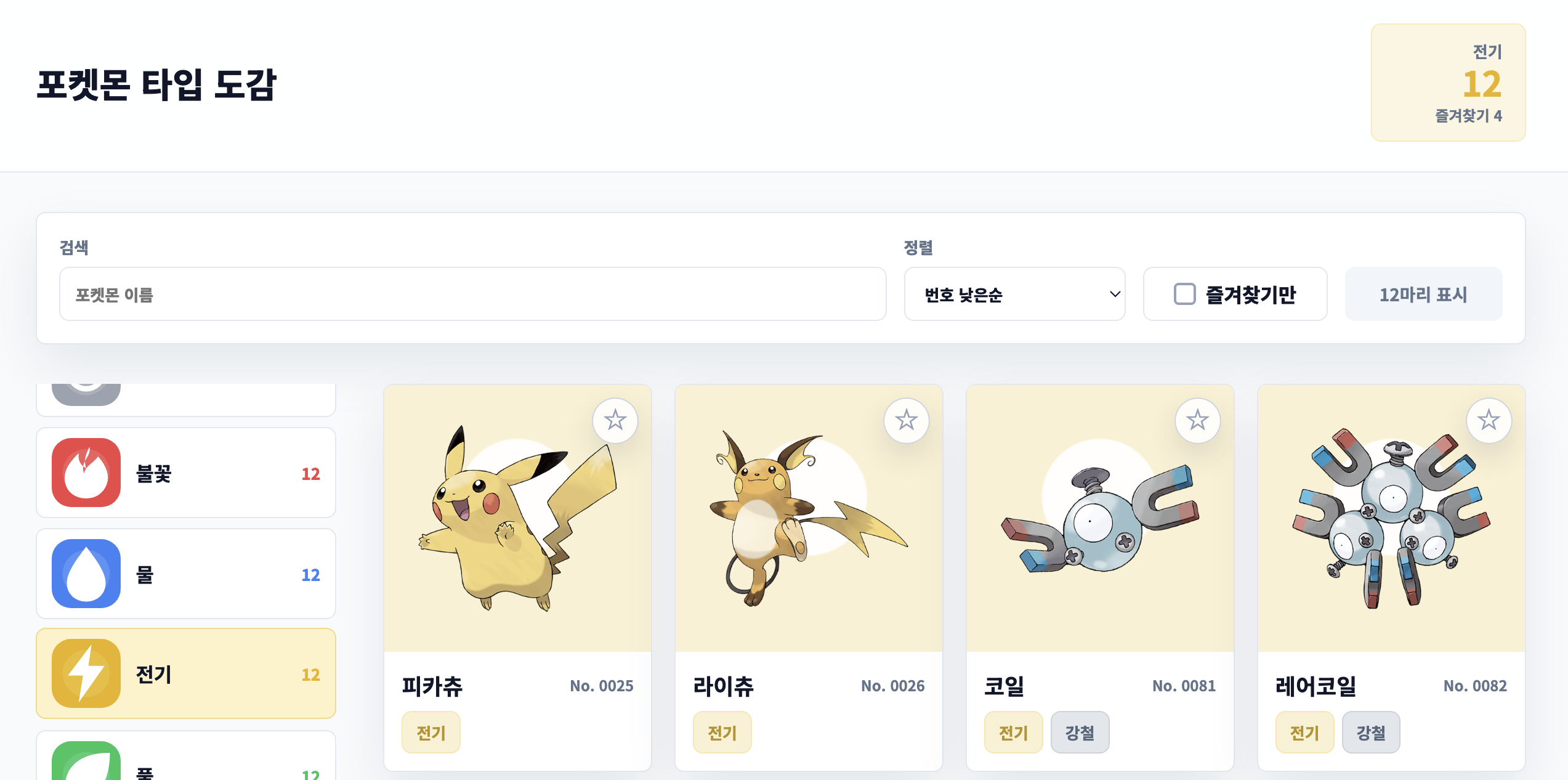
왼쪽에 타입을 선택하면 지정한 타입의 포켓몬만을 확인할 수 있습니다.

포켓몬 이름 검색이 가능합니다.

세 가지 정렬이 가능합니다.
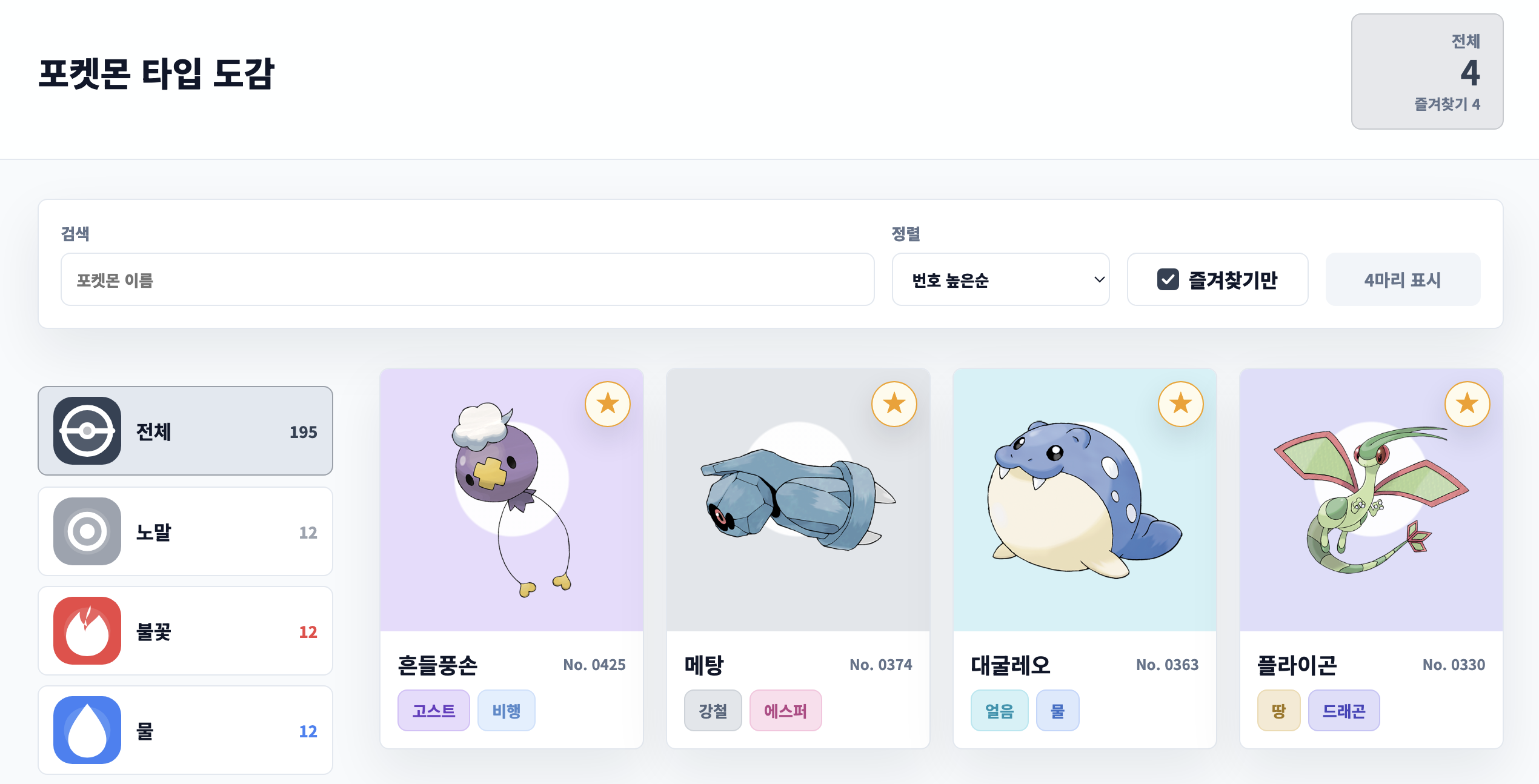
즐겨찾기 등록 및 즐겨찾기만 한 포켓몬만 확인할 수 있습니다.
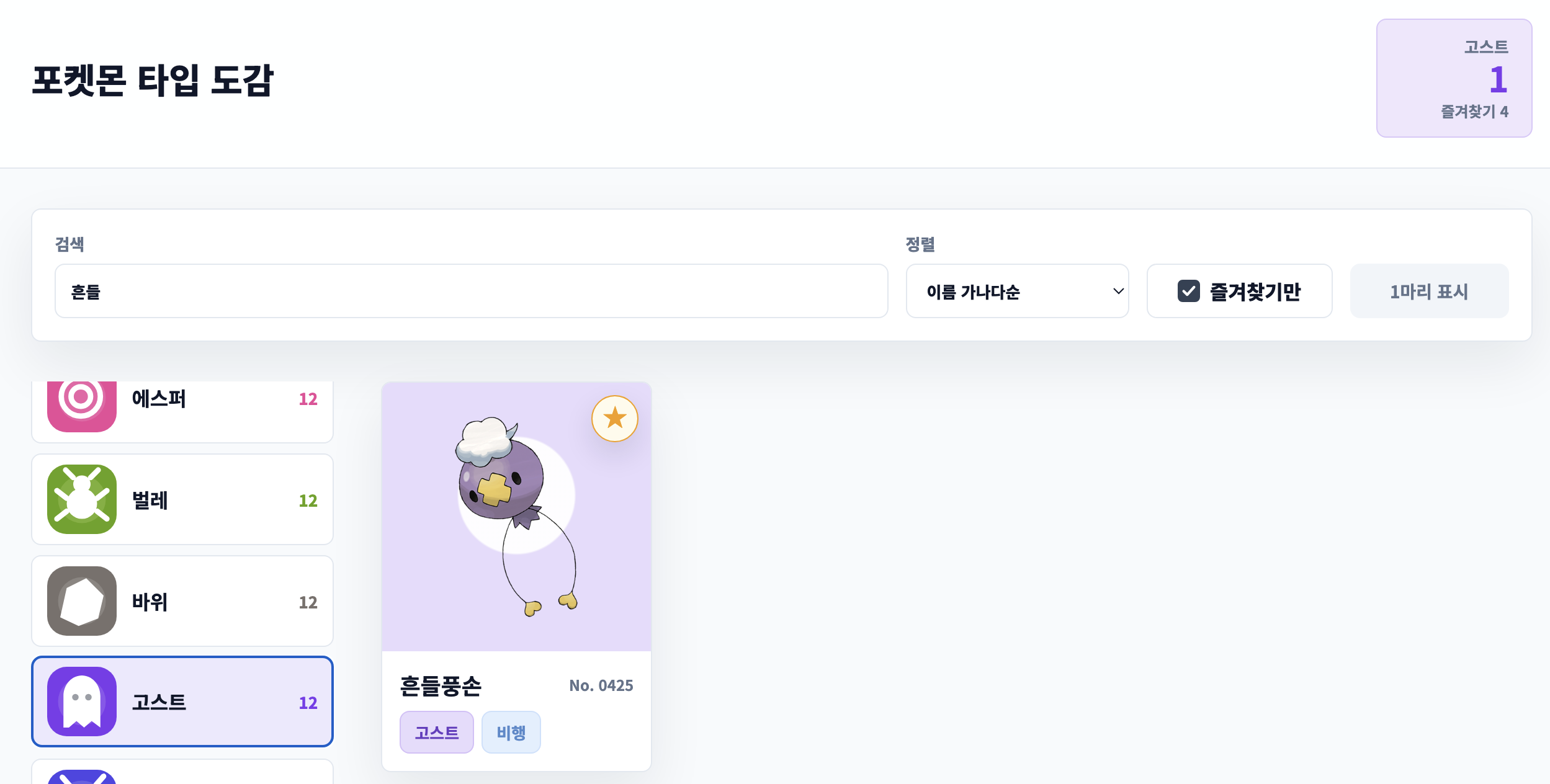
이러한 조건은 중복해서 처리할 수 있습니다.
이를 여러 방법으로 구현해볼 예정입니다.
공통
index.html
<!DOCTYPE html>
<html lang="ko">
<head>
    <title>포켓몬 도감</title>
    <meta charset="UTF-8" />
    <meta name="viewport" content="width=device-width, initial-scale=1.0" />
    <link rel="preconnect" href="https://fonts.googleapis.com" />
    <link rel="preconnect" href="https://fonts.gstatic.com" crossorigin />
    <link href="https://fonts.googleapis.com/css2?family=Noto+Sans+KR:wght@400;500;700;800&display=swap" rel="stylesheet" />
    <link rel="stylesheet" href="./src/styles.css" />
</head>
<body>
    <div id="app"></div>
    <script type="module" src="./src/index.js"></script>
</body>
</html>
브라우저가 처음 로드하는 HTML 문서입니다.
index.js
import App from './App.js';

const $app = document.getElementById('app');

new App($app);
index.html에서 호출하는, 웹의 진입점입니다.
index.html 안에서 id가 app인 div를 가져오고, 그 DOM 요소를 루트 컴포넌트인 App의 생성자 파라미터로 전달합니다.
이후 App은 전달받은 $app 내부에 앱 화면을 구성합니다.
즉 App에서 앱 전체 상태, 컴포넌트 생성, 이벤트 연결, 상태 변경 후 갱신 흐름을 관리하는 구조가 됩니다.
그리고 이러한 App을 제외한 나머지 요소는 모두 동일합니다.
컴포넌트
컴포넌트는 다음과 같은 패턴을 가지고 있습니다.
- template()
- 컴포넌트의 HTML 구조를 문자열로 반환하는 함수입니다.
- 변하지 않는 기본 DOM 구조를 만들기 위해 사용합니다.
- cacheElements()
- template()으로 만들어진 DOM 요소 중 render()에서 반복해서 사용할 요소를 미리 찾아 저장합니다.
- render()
- 현재 state를 기준으로 동적으로 변경되는 데이터를 DOM에 반영합니다.
- setState()
- 외부에서 변경된 상태를 컴포넌트 내부 state에 적용하고 다시 render()를 실행합니다.
Header.js

상단 제목과 요약 박스(전체 포켓몬, 즐겨찾기)를 담당하는 컴포넌트입니다.
전체 코드는 다음과 같습니다.
import { getTypeById } from '../data/pokemon.js';

export default function Header({ $app, initialState }) {
    this.state = initialState;
    this.$target = document.createElement('header');
    this.$target.className = 'header';
    $app.appendChild(this.$target);

    this.template = () => {
        return `
            <div>
                <a href="./" class="title">포켓몬 타입 도감</a>
            </div>
            <div class="summary">
                <span></span>
                <strong></strong>
                <em></em>
            </div>
        `;
    };

    this.cacheElements = () => {
        this.$summary = this.$target.querySelector('.summary');
        this.$typeName = this.$target.querySelector('.summary span');
        this.$count = this.$target.querySelector('.summary strong');
        this.$subText = this.$target.querySelector('.summary em');
    };

    this.render = () => {
        if (!this.$summary) {
            this.$target.innerHTML = this.template();
            this.cacheElements();
        }

        const selectedType = getTypeById(this.state.selectedType);
        this.$summary.style.setProperty('--summary-color', selectedType.color);
        this.$typeName.textContent = selectedType.name;
        this.$count.textContent = this.state.visibleCount;
        this.$subText.textContent = `즐겨찾기 ${this.state.favoriteIds.length}`;
    };

    this.setState = (newState) => {
        this.state = newState;
        this.render();
    };

    this.render();
}
이 컴포넌트는 고정된 구조에 필요한 데이터만 교체하면 되므로, template()에 표현식을 사용하지 않았습니다.
FilterPanel.js

FilterPanel은 검색어, 정렬 기준, 즐겨찾기만 보기 여부에 따라 포켓몬 목록을 필터링하고 표시 상태를 보여주는 컴포넌트입니다.
전체 코드는 다음과 같습니다.
export default function FilterPanel({ $app, initialState, handleSearchInput, handleSortChange, handleFavoriteOnlyChange }) {
    this.state = initialState;
    this.handleSearchInput = handleSearchInput;
    this.handleSortChange = handleSortChange;
    this.handleFavoriteOnlyChange = handleFavoriteOnlyChange;
    this.$target = document.createElement('section');
    this.$target.className = 'filter-panel';
    $app.appendChild(this.$target);

    this.template = () => {
        return `
            <label class="field">
                <span>검색</span>
                <input type="search" placeholder="포켓몬 이름" />
            </label>
            <label class="field">
                <span>정렬</span>
                <select>
                    <option value="id-asc">번호 낮은순</option>
                    <option value="id-desc">번호 높은순</option>
                    <option value="name-asc">이름 가나다순</option>
                </select>
            </label>
            <label class="favorite-filter">
                <input type="checkbox" />
                <span>즐겨찾기만</span>
            </label>
            <strong class="loading-status"></strong>
        `;
    };

    this.cacheElements = () => {
        this.$searchInput = this.$target.querySelector('input[type="search"]');
        this.$sortSelect = this.$target.querySelector('select');
        this.$favoriteLabel = this.$target.querySelector('.favorite-filter');
        this.$favoriteOnlyInput = this.$target.querySelector('.favorite-filter input');
        this.$loading = this.$target.querySelector('.loading-status');
    };

    this.bindEvents = () => {
        this.$searchInput.addEventListener('input', (event) => {
            this.handleSearchInput(event.target.value);
        });

        this.$sortSelect.addEventListener('change', (event) => {
            this.handleSortChange(event.target.value);
        });

        this.$favoriteOnlyInput.addEventListener('change', (event) => {
            this.handleFavoriteOnlyChange(event.target.checked);
        });
    };

    this.render = () => {
        if (!this.$searchInput) {
            this.$target.innerHTML = this.template();
            this.cacheElements();
            this.bindEvents();
        }

        const isFavoriteFilterDisabled = this.state.favoriteIds.length === 0 && !this.state.favoriteOnly;

        if (this.$searchInput.value !== this.state.searchQuery) {
            this.$searchInput.value = this.state.searchQuery;
        }

        this.$sortSelect.value = this.state.sortOrder;
        this.$favoriteOnlyInput.checked = this.state.favoriteOnly;
        this.$favoriteOnlyInput.disabled = isFavoriteFilterDisabled;
        this.$favoriteLabel.classList.toggle('disabled', isFavoriteFilterDisabled);
        this.$loading.textContent = this.state.isLoading ? '불러오는 중' : `${this.state.visibleCount}마리 표시`;
        this.$target.classList.toggle('loading', this.state.isLoading);
    };

    this.setState = (newState) => {
        this.state = newState;
        this.render();
    };

    this.render();
}
bindEvents()를 통해 사용자 입력 이벤트를 App.js의 핸들러와 연결했습니다.
이를 통해 이벤트가 발생하면 그 입력값을 App.js로 전달합니다.
또한, 이 컴포넌트는 고정된 구조에 필요한 데이터만 교체하면 되므로, template()에 표현식을 사용하지 않았습니다.
TypeList.js
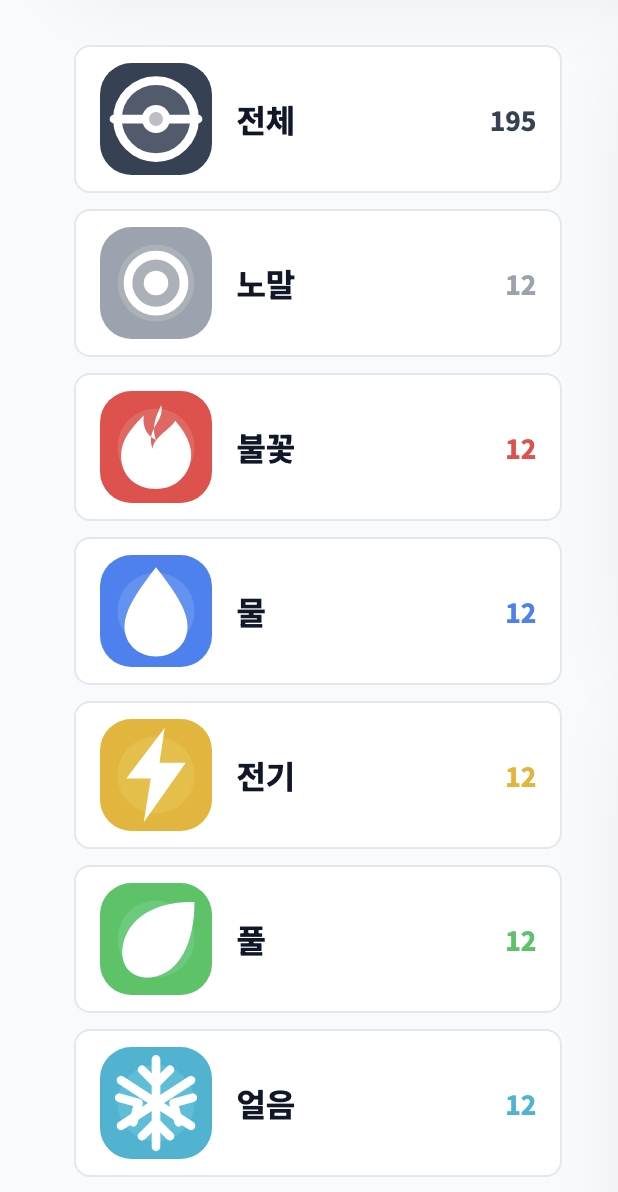
타입 목록을 관리하고, 특정 타입을 선택하면 해당 타입에 맞는 포켓몬 검색 기능을 제공하는 컴포넌트입니다.
전체 코드는 다음과 같습니다.
import { pokemonTypes } from '../data/pokemon.js';

export default function TypeList({ $app, initialState, handleTypeClick }) {
    this.state = initialState;
    this.handleTypeClick = handleTypeClick;
    this.$target = document.createElement('aside');
    this.$target.className = 'type-list';
    $app.appendChild(this.$target);

    this.buttonTemplate = (type) => {
        return `
            <button
                class="type-button"
                id="${type.id}"
                type="button"
                style="--type-color: ${type.color}; --type-soft-color: ${type.softColor}"
                aria-label="${type.name} 타입 보기"
            >
                <img class="type-icon ${type.id === 'all' ? 'all-icon' : ''}" src="${type.icon}" alt="${type.name} 타입" />
                <span>${type.name}</span>
                <small>${type.count}</small>
            </button>
        `;
    };

    this.template = () => {
        return `
            <nav aria-label="포켓몬 타입">
                ${pokemonTypes.map(this.buttonTemplate).join('')}
            </nav>
        `;
    };

    this.bindEvents = () => {
        this.$target.querySelectorAll('.type-button').forEach(($button) => {
            $button.addEventListener('click', () => {
                this.handleTypeClick($button.id);
            });
        });
    };

    this.alignSelectedType = () => {
        const $selectedButton = this.$target.querySelector('.type-button.clicked');
        if (!$selectedButton) {
            return;
        }

        requestAnimationFrame(() => {
            $selectedButton.scrollIntoView({
                block: 'nearest',
                inline: 'nearest',
                behavior: 'smooth'
            });
        });
    };

    this.render = () => {
        if (!this.$target.querySelector('nav')) {
            this.$target.innerHTML = this.template();
            this.bindEvents();
        }

        this.$target.querySelectorAll('.type-button').forEach(($button) => {
            const isSelected = $button.id === this.state.selectedType;
            $button.classList.toggle('clicked', isSelected);
            $button.setAttribute('aria-pressed', String(isSelected));
        });
    };

    this.setState = (newState) => {
        this.state = newState;
        this.render();
    };

    this.render();
}
여러 타입에 대한 컴포넌트를 나열해야 하므로 template()에 표현식을 사용했습니다.
bindEvents()를 통해 선택한 타입을 App.js에게 전달합니다.
PokemonList.js
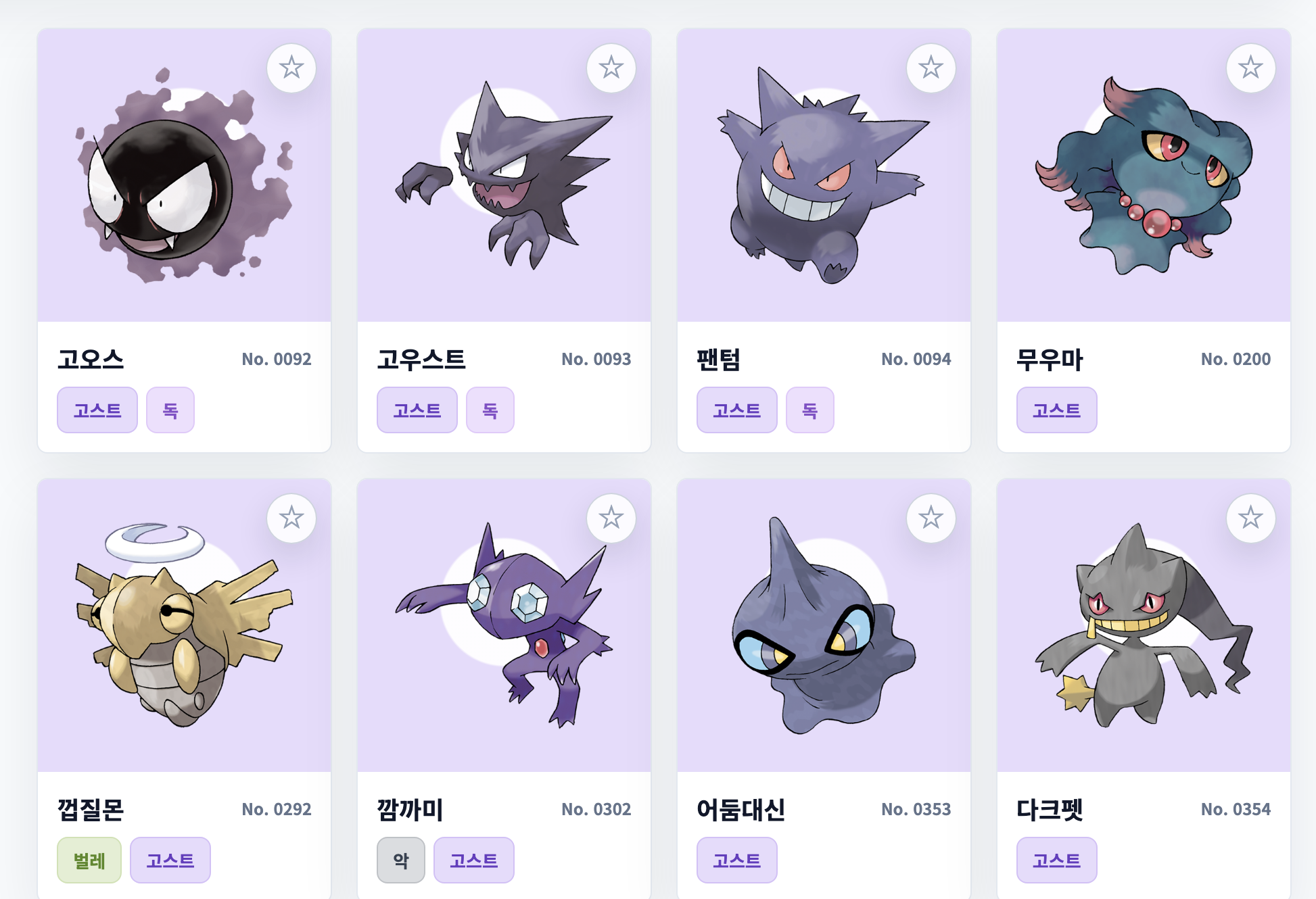
포켓몬 목록을 관리하는 컴포넌트입니다.
전체 코드는 다음과 같습니다.
import { getTypeColorByName } from '../data/pokemon.js';

export default function PokemonList({ $app, initialState, handleFavoriteToggle }) {
    this.state = initialState;
    this.handleFavoriteToggle = handleFavoriteToggle;
    this.renderedPokemonKey = '';
    this.$target = document.createElement('section');
    this.$target.className = 'pokemon-list';
    $app.appendChild(this.$target);

    this.template = () => {
        return `<div class="pokemon-items-container"></div>`;
    };

    this.cardTemplate = (item) => {
        return `
            <article class="pokemon-item" data-pokemon-id="${item.id}" style="--card-color: ${item.color}">
                <div class="image-panel">
                    <img src="${item.image}" alt="${item.name}" loading="lazy" />
                </div>
                <div class="pokemon-item-info">
                    <strong>${item.name}</strong>
                    <span>No. ${String(item.id).padStart(4, '0')}</span>
                </div>
                <button class="favorite-button" type="button" aria-label="${item.name} 즐겨찾기"></button>
                <div class="pokemon-tags">
                    ${item.types.map((typeName) => `
                        <span style="--tag-color: ${getTypeColorByName(typeName)}">${typeName}</span>
                    `).join('')}
                </div>
            </article>
        `;
    };

    this.emptyTemplate = () => {
        return `<div class="empty-result">조건에 맞는 포켓몬이 없습니다.</div>`;
    };

    this.cacheElements = () => {
        this.$container = this.$target.querySelector('.pokemon-items-container');
    };

    this.bindFavoriteEvents = () => {
        this.$target.querySelectorAll('.favorite-button').forEach(($button) => {
            $button.addEventListener('click', () => {
                const pokemonId = Number($button.closest('.pokemon-item').dataset.pokemonId);
                this.handleFavoriteToggle(pokemonId);
            });
        });
    };

    this.updateFavoriteButtons = () => {
        this.$target.querySelectorAll('.favorite-button').forEach(($button) => {
            const pokemonId = Number($button.closest('.pokemon-item').dataset.pokemonId);
            const isFavorite = this.state.favoriteIds.includes(pokemonId);
            $button.classList.toggle('active', isFavorite);
            $button.textContent = isFavorite ? '★' : '☆';
        });
    };

    this.render = () => {
        if (!this.$container) {
            this.$target.innerHTML = this.template();
            this.cacheElements();
        }

        this.$target.classList.toggle('loading', this.state.isLoading);
        const nextPokemonKey = this.state.visiblePokemon.map((item) => item.id).join(',');
        if (nextPokemonKey === this.renderedPokemonKey) {
            this.updateFavoriteButtons();
            return;
        }

        this.$container.innerHTML = this.state.visiblePokemon.length === 0
            ? this.emptyTemplate()
            : this.state.visiblePokemon.map(this.cardTemplate).join('');
        this.renderedPokemonKey = nextPokemonKey;
        this.bindFavoriteEvents();
        this.updateFavoriteButtons();
    };

    this.setState = (newState) => {
        this.state = newState;
        this.render();
    };

    this.render();
}
여러 포켓몬 목록을 그려야 하니 cardTemplate()을 만들어서 고정된 구조 template()과 구분되도록 했습니다.
1. Direct State + Direct Component Update
1번 예제는 App에서 state라는 객체로 직접 상태를 다루고, 업데이트할 컴포넌트를 직접 호출하는 방식입니다.
전체 코드는 다음과 같습니다.
import Header from './components/Header.js';
import TypeList from './components/TypeList.js';
import PokemonList from './components/PokemonList.js';
import FilterPanel from './components/FilterPanel.js';
import { getPokemonByType, getTypeById } from './data/pokemon.js';

const getTypeFromURL = () => {
    const params = new URLSearchParams(window.location.search);
    const type = params.get('type') || 'all';
    return getTypeById(type) ? type : 'all';
};

const writeTypeToURL = (typeId) => {
    const currentPath = window.location.pathname || '/';
    const nextUrl = typeId === 'all' ? currentPath : `${currentPath}?type=${typeId}`;
    history.pushState(null, null, nextUrl);
};

const resetPageScroll = () => {
    requestAnimationFrame(() => {
        window.scrollTo({
            top: 0,
            left: 0
        });
    });
};

export default function App($app) {
    let loadingTimer = null;
    let state = {
        selectedType: getTypeFromURL(),
        searchQuery: '',
        sortOrder: 'id-asc',
        favoriteOnly: false,
        favoriteIds: [],
        isLoading: false
    };

    const getVisiblePokemon = () => {
        const query = state.searchQuery.trim();
        const favoriteSet = new Set(state.favoriteIds);

        return getPokemonByType(state.selectedType)
            .filter((pokemon) => !query || pokemon.name.includes(query))
            .filter((pokemon) => !state.favoriteOnly || favoriteSet.has(pokemon.id))
            .sort((left, right) => {
                if (state.sortOrder === 'id-desc') {
                    return right.id - left.id;
                }

                if (state.sortOrder === 'name-asc') {
                    return left.name.localeCompare(right.name, 'ko');
                }

                return left.id - right.id;
            });
    };

    const getViewState = () => {
        const visiblePokemon = getVisiblePokemon();

        return {
            ...state,
            visiblePokemon,
            visibleCount: visiblePokemon.length
        };
    };

    const header = new Header({
        $app,
        initialState: getViewState()
    });

    const $main = document.createElement('main');
    $main.className = 'layout';
    $app.appendChild($main);

    const filterPanel = new FilterPanel({
        $app: $main,
        initialState: getViewState(),
        handleSearchInput,
        handleSortChange,
        handleFavoriteOnlyChange
    });

    const typeList = new TypeList({
        $app: $main,
        initialState: getViewState(),
        handleTypeClick
    });

    const pokemonList = new PokemonList({
        $app: $main,
        initialState: getViewState(),
        handleFavoriteToggle
    });

    const updateHeader = () => {
        header.setState(getViewState());
    };

    const updateFilterPanel = () => {
        filterPanel.setState(getViewState());
    };

    const updateTypeList = () => {
        typeList.setState(getViewState());
    };

    const updatePokemonList = () => {
        pokemonList.setState(getViewState());
    };

    const updateAllComponents = () => {
        updateHeader();
        updateFilterPanel();
        updateTypeList();
        updatePokemonList();
    };

    const finishLoadingSoon = () => {
        clearTimeout(loadingTimer);
        loadingTimer = setTimeout(() => {
            state = {
                ...state,
                isLoading: false
            };
            updateAllComponents();
        }, 240);
    };

    function handleTypeClick(typeId) {
        if (typeId === state.selectedType) {
            return;
        }

        // 1. 상태를 직접 바꾸고, 2. 영향을 받는 컴포넌트만 직접 갱신한다.
        state = {
            ...state,
            selectedType: typeId,
            isLoading: true
        };

        writeTypeToURL(typeId);
        updateAllComponents();
        typeList.alignSelectedType();
        resetPageScroll();
        finishLoadingSoon();
    }

    function handleSearchInput(searchQuery) {
        state = {
            ...state,
            searchQuery
        };
        updateAllComponents();
    }

    function handleSortChange(sortOrder) {
        state = {
            ...state,
            sortOrder
        };
        updateFilterPanel();
        updatePokemonList();
    }

    function handleFavoriteOnlyChange(favoriteOnly) {
        if (favoriteOnly && state.favoriteIds.length === 0) {
            updateFilterPanel();
            return;
        }

        state = {
            ...state,
            favoriteOnly
        };
        updateAllComponents();
    }

    function handleFavoriteToggle(pokemonId) {
        const favoriteIds = state.favoriteIds.includes(pokemonId)
            ? state.favoriteIds.filter((id) => id !== pokemonId)
            : [...state.favoriteIds, pokemonId];

        state = {
            ...state,
            favoriteIds,
            favoriteOnly: favoriteIds.length > 0 ? state.favoriteOnly : false
        };
        updateAllComponents();
    }

    window.addEventListener('popstate', () => {
        state = {
            ...state,
            selectedType: getTypeFromURL(),
            isLoading: true
        };
        updateAllComponents();
        typeList.alignSelectedType();
        resetPageScroll();
        finishLoadingSoon();
    });
}
이번 버전의 특징은 다음과 같습니다.
- 여러 컴포넌트가 공유해야 하는 앱 상태를 App의 state 하나에 모아 관리한다.
- App에서 업데이트할 컴포넌트를 직접 호출한다.
자세히 살펴보겠습니다.
// 상태 직접 관리
let state = {
    selectedType: getTypeFromURL(),
    searchQuery: '',
    sortOrder: 'id-asc',
    favoriteOnly: false,
    favoriteIds: [],
    isLoading: false
};
이처럼 App은 state라는 상태를 직접 관리합니다.
// 상태 초기화
let state = {
    searchQuery: ''
};

const filterPanel = new FilterPanel({
    $app: $main,
    initialState: state,
    handleSearchInput
});

const updateFilterPanel = () => {
    filterPanel.setState(state);
};

function handleSearchInput(searchQuery) {
    // App.js가 직접 상태 변경
    state = {
        ...state,
        searchQuery
    };

    // App.js가 직접 갱신할 컴포넌트를 지정
    updateFilterPanel();
}
App.js는 언제 특정 컴포넌트의 상태를 어떻게 변경해야 하는지 알고 있습니다.
이로 인해 다음과 같은 장단점을 가집니다.
장점
- 코드 흐름이 단순합니다.
- 상태가 어디서 바뀌는지 바로 보입니다.
- 작은 화면에서는 빠르게 만들 수 있습니다.
단점
- 상태를 직접 바꾸기 때문에 규칙이 약합니다.
- App의 이벤트 핸들러가 어떤 컴포넌트를 다시 그릴지 직접 기억해야 합니다.
- 상태 조회와 상태 변경 코드가 App 안에 함께 모여 있어 App 코드가 무거워집니다.
- 상태가 바뀐 뒤 화면 갱신을 App이 직접 호출해야 합니다.
2. updateState()와 render()
2번 예제는 App 안의 updateState()로 상태 변경을 모으고, 상태가 바뀌면 중앙 render()로 화면을 다시 갱신하는 방식입니다.
전체 코드는 다음과 같습니다.
import Header from './components/Header.js';
import TypeList from './components/TypeList.js';
import PokemonList from './components/PokemonList.js';
import FilterPanel from './components/FilterPanel.js';
import { getPokemonByType, getTypeById } from './data/pokemon.js';

const getTypeFromURL = () => {
    const params = new URLSearchParams(window.location.search);
    const type = params.get('type') || 'all';
    return getTypeById(type) ? type : 'all';
};

const writeTypeToURL = (typeId) => {
    const currentPath = window.location.pathname || '/';
    const nextUrl = typeId === 'all' ? currentPath : `${currentPath}?type=${typeId}`;
    history.pushState(null, null, nextUrl);
};

const resetPageScroll = () => {
    requestAnimationFrame(() => {
        window.scrollTo({
            top: 0,
            left: 0
        });
    });
};

export default function App($app) {
    let loadingTimer = null;
    let state = {
        selectedType: getTypeFromURL(),
        searchQuery: '',
        sortOrder: 'id-asc',
        favoriteOnly: false,
        favoriteIds: [],
        isLoading: false
    };

    const getVisiblePokemon = () => {
        const query = state.searchQuery.trim();
        const favoriteSet = new Set(state.favoriteIds);

        return getPokemonByType(state.selectedType)
            .filter((pokemon) => !query || pokemon.name.includes(query))
            .filter((pokemon) => !state.favoriteOnly || favoriteSet.has(pokemon.id))
            .sort((left, right) => {
                if (state.sortOrder === 'id-desc') {
                    return right.id - left.id;
                }

                if (state.sortOrder === 'name-asc') {
                    return left.name.localeCompare(right.name, 'ko');
                }

                return left.id - right.id;
            });
    };

    const getViewState = () => {
        const visiblePokemon = getVisiblePokemon();

        return {
            ...state,
            visiblePokemon,
            visibleCount: visiblePokemon.length
        };
    };

    const header = new Header({
        $app,
        initialState: getViewState()
    });

    const $main = document.createElement('main');
    $main.className = 'layout';
    $app.appendChild($main);

    const filterPanel = new FilterPanel({
        $app: $main,
        initialState: getViewState(),
        handleSearchInput,
        handleSortChange,
        handleFavoriteOnlyChange
    });

    const typeList = new TypeList({
        $app: $main,
        initialState: getViewState(),
        handleTypeClick
    });

    const pokemonList = new PokemonList({
        $app: $main,
        initialState: getViewState(),
        handleFavoriteToggle
    });

    const render = () => {
        const viewState = getViewState();
        header.setState(viewState);
        filterPanel.setState(viewState);
        typeList.setState(viewState);
        pokemonList.setState(viewState);
    };

    const updateState = (nextState) => {
        state = {
            ...state,
            ...nextState
        };
        render();
    };

    const finishLoadingSoon = () => {
        clearTimeout(loadingTimer);
        loadingTimer = setTimeout(() => {
            updateState({ isLoading: false });
        }, 240);
    };

    function handleTypeClick(typeId) {
        if (typeId === state.selectedType) {
            return;
        }

        updateState({
            selectedType: typeId,
            isLoading: true
        });
        writeTypeToURL(typeId);
        typeList.alignSelectedType();
        resetPageScroll();
        finishLoadingSoon();
    }

    function handleSearchInput(searchQuery) {
        updateState({ searchQuery });
    }

    function handleSortChange(sortOrder) {
        updateState({ sortOrder });
    }

    function handleFavoriteOnlyChange(favoriteOnly) {
        if (favoriteOnly && state.favoriteIds.length === 0) {
            updateState({ favoriteOnly: false });
            return;
        }

        updateState({ favoriteOnly });
    }

    function handleFavoriteToggle(pokemonId) {
        const favoriteIds = state.favoriteIds.includes(pokemonId)
            ? state.favoriteIds.filter((id) => id !== pokemonId)
            : [...state.favoriteIds, pokemonId];

        updateState({
            favoriteIds,
            favoriteOnly: favoriteIds.length > 0 ? state.favoriteOnly : false
        });
    }

    window.addEventListener('popstate', () => {
        updateState({
            selectedType: getTypeFromURL(),
            isLoading: true
        });
        typeList.alignSelectedType();
        resetPageScroll();
        finishLoadingSoon();
    });
}
1번 예제와의 가장 큰 차이점은 다음과 같습니다.
// 상태 관리 전용 함수 추가
const updateState = (nextState) => {
    state = {
        ...state,
        ...nextState
    };

    render();
};

// 컴포넌트 갱신을 render()에서 모두 처리
const render = () => {
    const viewState = getViewState();

    header.setState(viewState);
    filterPanel.setState(viewState);
    typeList.setState(viewState);
    pokemonList.setState(viewState);
};

// 이벤트 핸들러는 updateState()만 호출
function handleSortChange(sortOrder) {
    updateState({ sortOrder });
}
상태 관리 전용 함수를 추가하고, 컴포넌트 갱신을 render()에서 모두 처리하는 것입니다.
이로 인해 이벤트 핸들러는 updateState()만을 호출하면 됩니다.
// 상태 변경 후 어떤 컴포넌트를 다시 갱신해야 하는지 이벤트 핸들러가 알아야 함
function handleSortChange(sortOrder) {
    state = {
        ...state,
        sortOrder
    };

    updateFilterPanel();
    updatePokemonList();
}
1번 예제의 경우 상태 변경 후 어떤 컴포넌트를 다시 갱신해야 하는지 이벤트 핸들러가 알아야 하므로, 이를 극복했다고 볼 수 있습니다.
즉, 1번 예제의 다음 단점을 극복한 것입니다.
- 상태를 직접 바꾸기 때문에 규칙이 약합니다.
- 상태 변경을 updateState() 한 곳으로 모아, 상태를 바꾸는 규칙을 만들었습니다.
- App의 이벤트 핸들러가 어떤 컴포넌트를 다시 그릴지 직접 기억해야 합니다.
- 컴포넌트 갱신을 render() 한 곳으로 모아, 이벤트 핸들러가 갱신 대상을 직접 고르지 않게 했습니다.
하지만 2번 예제는 아직 다음과 같은 단점을 가지고 있습니다.
- 상태 조회와 상태 변경 코드가 App 안에 함께 모여 있어 App 코드가 무거워집니다.
- 상태가 바뀐 뒤 화면 갱신을 App이 직접 호출해야 합니다.
3. Minimal Store
3번 예제는 상태를 저장하고 관리하는 Store 객체를 App 외부에서 선언하고, Store 객체 자체가 상태 조회 및 변경 함수를 제공하는 방식입니다.
전체 코드는 다음과 같습니다.
import Header from './components/Header.js';
import TypeList from './components/TypeList.js';
import PokemonList from './components/PokemonList.js';
import FilterPanel from './components/FilterPanel.js';
import { getPokemonByType, getTypeById } from './data/pokemon.js';

const getTypeFromURL = () => {
    const params = new URLSearchParams(window.location.search);
    const type = params.get('type') || 'all';
    return getTypeById(type) ? type : 'all';
};

const writeTypeToURL = (typeId) => {
    const currentPath = window.location.pathname || '/';
    const nextUrl = typeId === 'all' ? currentPath : `${currentPath}?type=${typeId}`;
    history.pushState(null, null, nextUrl);
};

const resetPageScroll = () => {
    requestAnimationFrame(() => {
        window.scrollTo({
            top: 0,
            left: 0
        });
    });
};

const createStore = (initialState) => {
    let state = initialState;

    return {
        getState() {
            return state;
        },
        setState(nextState) {
            state = {
                ...state,
                ...nextState
            };
        }
    };
};

export default function App($app) {
    let loadingTimer = null;
    const store = createStore({
        selectedType: getTypeFromURL(),
        searchQuery: '',
        sortOrder: 'id-asc',
        favoriteOnly: false,
        favoriteIds: [],
        isLoading: false
    });

    const getVisiblePokemon = () => {
        const state = store.getState();
        const query = state.searchQuery.trim();
        const favoriteSet = new Set(state.favoriteIds);

        return getPokemonByType(state.selectedType)
            .filter((pokemon) => !query || pokemon.name.includes(query))
            .filter((pokemon) => !state.favoriteOnly || favoriteSet.has(pokemon.id))
            .sort((left, right) => {
                if (state.sortOrder === 'id-desc') {
                    return right.id - left.id;
                }

                if (state.sortOrder === 'name-asc') {
                    return left.name.localeCompare(right.name, 'ko');
                }

                return left.id - right.id;
            });
    };

    const getViewState = () => {
        const visiblePokemon = getVisiblePokemon();

        return {
            ...store.getState(),
            visiblePokemon,
            visibleCount: visiblePokemon.length
        };
    };

    const header = new Header({
        $app,
        initialState: getViewState()
    });

    const $main = document.createElement('main');
    $main.className = 'layout';
    $app.appendChild($main);

    const filterPanel = new FilterPanel({
        $app: $main,
        initialState: getViewState(),
        handleSearchInput,
        handleSortChange,
        handleFavoriteOnlyChange
    });

    const typeList = new TypeList({
        $app: $main,
        initialState: getViewState(),
        handleTypeClick
    });

    const pokemonList = new PokemonList({
        $app: $main,
        initialState: getViewState(),
        handleFavoriteToggle
    });

    const render = () => {
        const viewState = getViewState();
        header.setState(viewState);
        filterPanel.setState(viewState);
        typeList.setState(viewState);
        pokemonList.setState(viewState);
    };

    const finishLoadingSoon = () => {
        clearTimeout(loadingTimer);
        loadingTimer = setTimeout(() => {
            store.setState({ isLoading: false });
            render();
        }, 240);
    };

    function handleTypeClick(typeId) {
        if (typeId === store.getState().selectedType) {
            return;
        }

        store.setState({
            selectedType: typeId,
            isLoading: true
        });
        render();
        writeTypeToURL(typeId);
        typeList.alignSelectedType();
        resetPageScroll();
        finishLoadingSoon();
    }

    function handleSearchInput(searchQuery) {
        store.setState({ searchQuery });
        render();
    }

    function handleSortChange(sortOrder) {
        store.setState({ sortOrder });
        render();
    }

    function handleFavoriteOnlyChange(favoriteOnly) {
        if (favoriteOnly && store.getState().favoriteIds.length === 0) {
            render();
            return;
        }

        store.setState({ favoriteOnly });
        render();
    }

    function handleFavoriteToggle(pokemonId) {
        const favoriteIds = store.getState().favoriteIds.includes(pokemonId)
            ? store.getState().favoriteIds.filter((id) => id !== pokemonId)
            : [...store.getState().favoriteIds, pokemonId];

        store.setState({
            favoriteIds,
            favoriteOnly: favoriteIds.length > 0 ? store.getState().favoriteOnly : false
        });
        render();
    }

    window.addEventListener('popstate', () => {
        store.setState({
            selectedType: getTypeFromURL(),
            isLoading: true
        });
        render();
        typeList.alignSelectedType();
        resetPageScroll();
        finishLoadingSoon();
    });
}
2번 예제와 가장 큰 차이점은 다음과 같습니다.
// 상태 관리용 객체 추가
const createStore = (initialState) => {
    let state = initialState;

    return {
        getState() {
            return state;
        },
        setState(nextState) {
            state = {
                ...state,
                ...nextState
            };
        }
    };
};

// App 내부에서 초기화
const store = createStore({
    selectedType: getTypeFromURL(),
    searchQuery: '',
    sortOrder: 'id-asc',
    favoriteOnly: false,
    favoriteIds: [],
    isLoading: false
});


// 상태 조회 시 store.getState() 호출
const getVisiblePokemon = () => {
    const state = store.getState();
    const query = state.searchQuery.trim();
    const favoriteSet = new Set(state.favoriteIds);

    return getPokemonByType(state.selectedType)
        .filter((pokemon) => !query || pokemon.name.includes(query))
        .filter((pokemon) => !state.favoriteOnly || favoriteSet.has(pokemon.id));
};

// 상태 변경 시 store.setState() 호출
function handleSearchInput(searchQuery) {
    store.setState({ searchQuery });
    render();
}
상태를 변경하고 가져오는 행위를 Store 객체에게 위임했습니다.
이로 인해 앞서 언급된 단점인, 상태 조회와 상태 변경 코드가 App 안에 함께 모여 있어 App 코드가 무거워진다는 단점을 해결했습니다.
그래도 여전히 다음과 같은 단점이 남아 있습니다.
- 상태가 바뀐 뒤 화면 갱신을 App이 직접 호출해야 합니다.
4. Pub-Sub
4번 예제는 store.subscribe()로 상태 변경 후 실행할 화면 갱신 함수를 등록해, App이 직접 render()를 호출하지 않아도 구독자가 화면을 갱신하게 만든 예제입니다.
전체 코드는 다음과 같습니다.
import Header from './components/Header.js';
import TypeList from './components/TypeList.js';
import PokemonList from './components/PokemonList.js';
import FilterPanel from './components/FilterPanel.js';
import { getPokemonByType, getTypeById } from './data/pokemon.js';

const getTypeFromURL = () => {
    const params = new URLSearchParams(window.location.search);
    const type = params.get('type') || 'all';
    return getTypeById(type) ? type : 'all';
};

const writeTypeToURL = (typeId) => {
    const currentPath = window.location.pathname || '/';
    const nextUrl = typeId === 'all' ? currentPath : `${currentPath}?type=${typeId}`;
    history.pushState(null, null, nextUrl);
};

const resetPageScroll = () => {
    requestAnimationFrame(() => {
        window.scrollTo({
            top: 0,
            left: 0
        });
    });
};

const createStore = (initialState) => {
    let state = initialState;
    const listeners = new Set();

    return {
        getState: () => state,
        setState(nextState) {
            const prevState = state;
            state = {
                ...state,
                ...nextState
            };
            listeners.forEach((listener) => listener(state, prevState));
        },
        subscribe(listener) {
            listeners.add(listener);
            return () => listeners.delete(listener);
        }
    };
};

export default function App($app) {
    let loadingTimer = null;
    const store = createStore({
        selectedType: getTypeFromURL(),
        searchQuery: '',
        sortOrder: 'id-asc',
        favoriteOnly: false,
        favoriteIds: [],
        isLoading: false
    });

    const getVisiblePokemon = () => {
        const state = store.getState();
        const query = state.searchQuery.trim();
        const favoriteSet = new Set(state.favoriteIds);

        return getPokemonByType(state.selectedType)
            .filter((pokemon) => !query || pokemon.name.includes(query))
            .filter((pokemon) => !state.favoriteOnly || favoriteSet.has(pokemon.id))
            .sort((left, right) => {
                if (state.sortOrder === 'id-desc') {
                    return right.id - left.id;
                }

                if (state.sortOrder === 'name-asc') {
                    return left.name.localeCompare(right.name, 'ko');
                }

                return left.id - right.id;
            });
    };

    const getViewState = () => {
        const visiblePokemon = getVisiblePokemon();

        return {
            ...store.getState(),
            visiblePokemon,
            visibleCount: visiblePokemon.length
        };
    };

    const header = new Header({
        $app,
        initialState: getViewState()
    });

    const $main = document.createElement('main');
    $main.className = 'layout';
    $app.appendChild($main);

    const filterPanel = new FilterPanel({
        $app: $main,
        initialState: getViewState(),
        handleSearchInput,
        handleSortChange,
        handleFavoriteOnlyChange
    });

    const typeList = new TypeList({
        $app: $main,
        initialState: getViewState(),
        handleTypeClick
    });

    const pokemonList = new PokemonList({
        $app: $main,
        initialState: getViewState(),
        handleFavoriteToggle
    });

    // 이벤트 핸들러가 갱신 대상을 직접 기억하지 않도록 구독자로 분리한다.
    store.subscribe(() => header.setState(getViewState()));
    store.subscribe(() => filterPanel.setState(getViewState()));
    store.subscribe(() => typeList.setState(getViewState()));
    store.subscribe(() => pokemonList.setState(getViewState()));
    store.subscribe(() => typeList.alignSelectedType());

    const finishLoadingSoon = () => {
        clearTimeout(loadingTimer);
        loadingTimer = setTimeout(() => {
            store.setState({ isLoading: false });
        }, 240);
    };

    function handleTypeClick(typeId) {
        if (typeId === store.getState().selectedType) {
            return;
        }

        store.setState({ selectedType: typeId, isLoading: true });
        writeTypeToURL(typeId);
        resetPageScroll();
        finishLoadingSoon();
    }

    function handleSearchInput(searchQuery) {
        store.setState({ searchQuery });
    }

    function handleSortChange(sortOrder) {
        store.setState({ sortOrder });
    }

    function handleFavoriteOnlyChange(favoriteOnly) {
        if (favoriteOnly && store.getState().favoriteIds.length === 0) {
            return;
        }

        store.setState({ favoriteOnly });
    }

    function handleFavoriteToggle(pokemonId) {
        const favoriteIds = store.getState().favoriteIds.includes(pokemonId)
            ? store.getState().favoriteIds.filter((id) => id !== pokemonId)
            : [...store.getState().favoriteIds, pokemonId];

        store.setState({
            favoriteIds,
            favoriteOnly: favoriteIds.length > 0 ? store.getState().favoriteOnly : false
        });
    }

    window.addEventListener('popstate', () => {
        store.setState({ selectedType: getTypeFromURL(), isLoading: true });
        resetPageScroll();
        finishLoadingSoon();
    });
}
가장 큰 차이점은 다음과 같습니다.
// Store 객체에 리스너 등록 메서드 추가
const createStore = (initialState) => {
    let state = initialState;
    const listeners = new Set();

    return {
        getState: () => state,
        setState(nextState) {
            const prevState = state;
            state = {
                ...state,
                ...nextState
            };
            listeners.forEach((listener) => listener(state, prevState));
        },
        subscribe(listener) {
            listeners.add(listener);
            return () => listeners.delete(listener);
        }
    };
};

// Store에 컴포넌트 상태 갱신 로직(리스너) 등록
store.subscribe(() => filterPanel.setState(getViewState()));
store.subscribe(() => pokemonList.setState(getViewState()));

// 이벤트 핸들러에서 Store 상태를 변경하면 등록된 모든 리스너가 실행됨
function handleSearchInput(searchQuery) {
    store.setState({ searchQuery });
}
이를 통해
- 상태가 바뀐 뒤 화면 갱신을 App이 직접 호출해야 합니다.
이 단점을 극복했습니다.
하지만 리스너를 등록하면서 다음과 같은 문제가 새롭게 생겼습니다.
- 상태가 바뀌면 모든 리스너가 실행됩니다.
5. Selector Subscription
5번 예제는 각 리스너가 selector로 고른 상태 값이 바뀔 때만 실행되는 방식입니다.
전체 코드는 다음과 같습니다.
import Header from './components/Header.js';
import TypeList from './components/TypeList.js';
import PokemonList from './components/PokemonList.js';
import FilterPanel from './components/FilterPanel.js';
import { getPokemonByType, getTypeById } from './data/pokemon.js';

const getTypeFromURL = () => {
    const params = new URLSearchParams(window.location.search);
    const type = params.get('type') || 'all';
    return getTypeById(type) ? type : 'all';
};

const writeTypeToURL = (typeId) => {
    const currentPath = window.location.pathname || '/';
    const nextUrl = typeId === 'all' ? currentPath : `${currentPath}?type=${typeId}`;
    history.pushState(null, null, nextUrl);
};

const resetPageScroll = () => {
    requestAnimationFrame(() => {
        window.scrollTo({
            top: 0,
            left: 0
        });
    });
};

const shallowEqual = (left, right) => Object.is(left, right);

const createSelectorStore = (initialState) => {
    let state = initialState;
    const subscriptions = new Set();

    return {
        getState: () => state,
        setState(nextState) {
            const prevState = state;
            state = {
                ...state,
                ...nextState
            };

            subscriptions.forEach((subscription) => {
                const nextSelected = subscription.selector(state);
                if (!subscription.isEqual(subscription.selected, nextSelected)) {
                    const prevSelected = subscription.selected;
                    subscription.selected = nextSelected;
                    subscription.listener(nextSelected, prevSelected, state, prevState);
                }
            });
        },
        subscribe(selector, listener, isEqual = shallowEqual) {
            const subscription = {
                selector,
                listener,
                isEqual,
                selected: selector(state)
            };

            subscriptions.add(subscription);
            return () => subscriptions.delete(subscription);
        }
    };
};

export default function App($app) {
    let loadingTimer = null;
    const store = createSelectorStore({
        selectedType: getTypeFromURL(),
        searchQuery: '',
        sortOrder: 'id-asc',
        favoriteOnly: false,
        favoriteIds: [],
        isLoading: false
    });

    const getVisiblePokemon = () => {
        const state = store.getState();
        const query = state.searchQuery.trim();
        const favoriteSet = new Set(state.favoriteIds);

        return getPokemonByType(state.selectedType)
            .filter((pokemon) => !query || pokemon.name.includes(query))
            .filter((pokemon) => !state.favoriteOnly || favoriteSet.has(pokemon.id))
            .sort((left, right) => {
                if (state.sortOrder === 'id-desc') {
                    return right.id - left.id;
                }

                if (state.sortOrder === 'name-asc') {
                    return left.name.localeCompare(right.name, 'ko');
                }

                return left.id - right.id;
            });
    };

    const getViewState = () => {
        const visiblePokemon = getVisiblePokemon();

        return {
            ...store.getState(),
            visiblePokemon,
            visibleCount: visiblePokemon.length
        };
    };

    const filterKey = (state) => [
        state.selectedType,
        state.searchQuery,
        state.sortOrder,
        state.favoriteOnly,
        state.favoriteIds.join(','),
        state.isLoading
    ].join('|');

    const headerKey = (state) => [
        state.selectedType,
        state.searchQuery,
        state.favoriteOnly,
        state.favoriteIds.join(',')
    ].join('|');

    const header = new Header({
        $app,
        initialState: getViewState()
    });

    const $main = document.createElement('main');
    $main.className = 'layout';
    $app.appendChild($main);

    const filterPanel = new FilterPanel({
        $app: $main,
        initialState: getViewState(),
        handleSearchInput,
        handleSortChange,
        handleFavoriteOnlyChange
    });

    const typeList = new TypeList({
        $app: $main,
        initialState: getViewState(),
        handleTypeClick
    });

    const pokemonList = new PokemonList({
        $app: $main,
        initialState: getViewState(),
        handleFavoriteToggle
    });

    const unsubscribeHeader = store.subscribe(
        headerKey,
        () => header.setState(getViewState())
    );

    const unsubscribeFilterPanel = store.subscribe(
        filterKey,
        () => filterPanel.setState(getViewState())
    );

    const unsubscribeTypeList = store.subscribe(
        (state) => state.selectedType,
        () => {
            typeList.setState(getViewState());
            typeList.alignSelectedType();
        }
    );

    const unsubscribePokemonList = store.subscribe(
        filterKey,
        () => pokemonList.setState(getViewState())
    );

    const finishLoadingSoon = () => {
        clearTimeout(loadingTimer);
        loadingTimer = setTimeout(() => {
            store.setState({ isLoading: false });
        }, 240);
    };

    function handleTypeClick(typeId) {
        if (typeId === store.getState().selectedType) {
            return;
        }

        store.setState({ selectedType: typeId, isLoading: true });
        writeTypeToURL(typeId);
        resetPageScroll();
        finishLoadingSoon();
    }

    function handleSearchInput(searchQuery) {
        store.setState({ searchQuery });
    }

    function handleSortChange(sortOrder) {
        store.setState({ sortOrder });
    }

    function handleFavoriteOnlyChange(favoriteOnly) {
        if (favoriteOnly && store.getState().favoriteIds.length === 0) {
            return;
        }

        store.setState({ favoriteOnly });
    }

    function handleFavoriteToggle(pokemonId) {
        const favoriteIds = store.getState().favoriteIds.includes(pokemonId)
            ? store.getState().favoriteIds.filter((id) => id !== pokemonId)
            : [...store.getState().favoriteIds, pokemonId];

        store.setState({
            favoriteIds,
            favoriteOnly: favoriteIds.length > 0 ? store.getState().favoriteOnly : false
        });
    }

    window.addEventListener('popstate', () => {
        store.setState({ selectedType: getTypeFromURL(), isLoading: true });
        resetPageScroll();
        finishLoadingSoon();
    });

    window.addEventListener('beforeunload', () => {
        unsubscribeHeader();
        unsubscribeFilterPanel();
        unsubscribeTypeList();
        unsubscribePokemonList();
    });
}
핵심은 다음과 같습니다.
// selector 결과가 바뀔 때만 컴포넌트를 갱신하는 리스너 등록
store.subscribe(
    filterKey,
    () => filterPanel.setState(getViewState())
);

// selector 결과가 바뀐 리스너만 실행
subscriptions.forEach((subscription) => {
    const nextSelected = subscription.selector(state);

    if (!subscription.isEqual(subscription.selected, nextSelected)) {
        subscription.selected = nextSelected;
        subscription.listener();
    }
});

// selectedType이 바뀔 때만 TypeList 리스너 실행
store.subscribe(
    (state) => state.selectedType,
    () => typeList.setState(getViewState())
);
모든 리스너가 실행되는 문제가 있었기 때문에, 화면을 갱신해야 하는 컴포넌트를 구분할 수 있도록 selector를 추가한 것입니다.
이로 인해 특정 컴포넌트의 상태와 관련된 특정 리스너들만 실행할 수 있게 되었습니다.
6. 편의성 개선
6번 예제는 상태와 직접적인 관련은 없지만, 여러 편의성을 개선한 예제입니다.
- template(), render(), setState() 반복
- DOM 요소를 찾는 과정의 반복
- 이벤트 연결 반복
App.js의 전체 코드는 다음과 같습니다.
import Header from './components/Header.js';
import TypeList from './components/TypeList.js';
import PokemonList from './components/PokemonList.js';
import FilterPanel from './components/FilterPanel.js';
import { getPokemonByType, getTypeById } from './data/pokemon.js';

const getTypeFromURL = () => {
    const params = new URLSearchParams(window.location.search);
    const type = params.get('type') || 'all';
    return getTypeById(type) ? type : 'all';
};

const writeTypeToURL = (typeId) => {
    const currentPath = window.location.pathname || '/';
    const nextUrl = typeId === 'all' ? currentPath : `${currentPath}?type=${typeId}`;
    history.pushState(null, null, nextUrl);
};

const resetPageScroll = () => {
    requestAnimationFrame(() => {
        window.scrollTo({
            top: 0,
            left: 0
        });
    });
};

const shallowEqual = (left, right) => Object.is(left, right);

const createSelectorStore = (initialState) => {
    let state = initialState;
    const subscriptions = new Set();

    return {
        getState: () => state,
        setState(nextState) {
            const prevState = state;
            state = {
                ...state,
                ...nextState
            };

            subscriptions.forEach((subscription) => {
                const nextSelected = subscription.selector(state);
                if (!subscription.isEqual(subscription.selected, nextSelected)) {
                    const prevSelected = subscription.selected;
                    subscription.selected = nextSelected;
                    subscription.listener(nextSelected, prevSelected, state, prevState);
                }
            });
        },
        subscribe(selector, listener, isEqual = shallowEqual) {
            const subscription = {
                selector,
                listener,
                isEqual,
                selected: selector(state)
            };

            subscriptions.add(subscription);
            return () => subscriptions.delete(subscription);
        }
    };
};

export default function App($app) {
    let loadingTimer = null;
    const store = createSelectorStore({
        selectedType: getTypeFromURL(),
        searchQuery: '',
        sortOrder: 'id-asc',
        favoriteOnly: false,
        favoriteIds: [],
        isLoading: false
    });

    const getVisiblePokemon = () => {
        const state = store.getState();
        const query = state.searchQuery.trim();
        const favoriteSet = new Set(state.favoriteIds);

        return getPokemonByType(state.selectedType)
            .filter((pokemon) => !query || pokemon.name.includes(query))
            .filter((pokemon) => !state.favoriteOnly || favoriteSet.has(pokemon.id))
            .sort((left, right) => {
                if (state.sortOrder === 'id-desc') {
                    return right.id - left.id;
                }

                if (state.sortOrder === 'name-asc') {
                    return left.name.localeCompare(right.name, 'ko');
                }

                return left.id - right.id;
            });
    };

    const getViewState = () => {
        const visiblePokemon = getVisiblePokemon();

        return {
            ...store.getState(),
            visiblePokemon,
            visibleCount: visiblePokemon.length
        };
    };

    const filterKey = (state) => [
        state.selectedType,
        state.searchQuery,
        state.sortOrder,
        state.favoriteOnly,
        state.favoriteIds.join(','),
        state.isLoading
    ].join('|');

    const headerKey = (state) => [
        state.selectedType,
        state.searchQuery,
        state.favoriteOnly,
        state.favoriteIds.join(',')
    ].join('|');

    const header = new Header({
        $app,
        initialState: getViewState()
    });

    const $main = document.createElement('main');
    $main.className = 'layout';
    $app.appendChild($main);

    const filterPanel = new FilterPanel({
        $app: $main,
        initialState: getViewState(),
        handleSearchInput,
        handleSortChange,
        handleFavoriteOnlyChange
    });

    const typeList = new TypeList({
        $app: $main,
        initialState: getViewState(),
        handleTypeClick
    });

    const pokemonList = new PokemonList({
        $app: $main,
        initialState: getViewState(),
        handleFavoriteToggle
    });

    const unsubscribeHeader = store.subscribe(
        headerKey,
        () => header.setState(getViewState())
    );

    const unsubscribeFilterPanel = store.subscribe(
        filterKey,
        () => filterPanel.setState(getViewState())
    );

    const unsubscribeTypeList = store.subscribe(
        (state) => state.selectedType,
        () => {
            typeList.setState(getViewState());
            typeList.alignSelectedType();
        }
    );

    const unsubscribePokemonList = store.subscribe(
        filterKey,
        () => pokemonList.setState(getViewState())
    );

    const finishLoadingSoon = () => {
        clearTimeout(loadingTimer);
        loadingTimer = setTimeout(() => {
            store.setState({ isLoading: false });
        }, 240);
    };

    function handleTypeClick(typeId) {
        if (typeId === store.getState().selectedType) {
            return;
        }

        store.setState({ selectedType: typeId, isLoading: true });
        writeTypeToURL(typeId);
        resetPageScroll();
        finishLoadingSoon();
    }

    function handleSearchInput(searchQuery) {
        store.setState({ searchQuery });
    }

    function handleSortChange(sortOrder) {
        store.setState({ sortOrder });
    }

    function handleFavoriteOnlyChange(favoriteOnly) {
        if (favoriteOnly && store.getState().favoriteIds.length === 0) {
            return;
        }

        store.setState({ favoriteOnly });
    }

    function handleFavoriteToggle(pokemonId) {
        const favoriteIds = store.getState().favoriteIds.includes(pokemonId)
            ? store.getState().favoriteIds.filter((id) => id !== pokemonId)
            : [...store.getState().favoriteIds, pokemonId];

        store.setState({
            favoriteIds,
            favoriteOnly: favoriteIds.length > 0 ? store.getState().favoriteOnly : false
        });
    }

    window.addEventListener('popstate', () => {
        store.setState({ selectedType: getTypeFromURL(), isLoading: true });
        resetPageScroll();
        finishLoadingSoon();
    });

    window.addEventListener('beforeunload', () => {
        unsubscribeHeader();
        unsubscribeFilterPanel();
        unsubscribeTypeList();
        unsubscribePokemonList();
    });
}
그리고 추가된 자바스크립트 파일은 다음과 같습니다.
// Component.js
export default class Component {
    constructor({ $app, initialState, tagName = 'div', className = '' }) {
        this.state = initialState;
        this.isMounted = false;
        this.$target = document.createElement(tagName);
        this.$target.className = className;
        $app.appendChild(this.$target);
    }

    template() {
        return '';
    }

    cacheElements() {
    }

    bindEvents() {
    }

    mount() {
        if (this.isMounted) {
            return;
        }

        this.$target.innerHTML = this.template();
        this.cacheElements();
        this.bindEvents();
        this.isMounted = true;
    }

    setState(newState) {
        this.state = newState;
        this.render();
    }

    render() {
        this.mount();
    }
}

// dom.js
export const $ = (target, selector) => target.querySelector(selector);

export const $$ = (target, selector) => [...target.querySelectorAll(selector)];

export const on = (target, eventName, selector, handler) => {
    target.addEventListener(eventName, (event) => {
        const $currentTarget = event.target.closest(selector);

        if (!$currentTarget || !target.contains($currentTarget)) {
            return;
        }

        handler(event, $currentTarget);
    });
};

export const renderList = (items, template) => items.map(template).join('');
개선한 부분은 다음과 같습니다.
// 공통 Component가 mount와 setState 흐름을 처리함
export default class Component {
    mount() {
        if (this.isMounted) {
            return;
        }

        this.$target.innerHTML = this.template();
        this.cacheElements();
        this.bindEvents();
        this.isMounted = true;
    }

    setState(newState) {
        this.state = newState;
        this.render();
    }
}

// 각 컴포넌트는 공통 Component를 상속해 반복되는 setState 작성 없이 render만 구현
export default class Header extends Component {
    render() {
        this.mount();
        this.$count.textContent = this.state.visibleCount;
    }
}
컴포넌트들이 공통적으로 사용하는 상태 관리 패턴을 상위 클래스인 Component로 분리했습니다.
이제 각 컴포넌트들은 공통 Component를 상속하므로 코드의 반복을 줄였습니다.
// DOM 조회 $ 헬퍼 선언
export const $ = (target, selector) => target.querySelector(selector);

// DOM 조회 반복을 $ 헬퍼로 줄임
cacheElements() {
    this.$summary = $(this.$target, '.summary');
    this.$count = $(this.$target, '.summary strong');
}
DOM을 조회하는 반복 코드는 헬퍼를 통해 해결했습니다.
// 이벤트 위임 헬퍼 선언
export const on = (target, eventName, selector, handler) => {
    target.addEventListener(eventName, (event) => {
        const $currentTarget = event.target.closest(selector);

        if (!$currentTarget || !target.contains($currentTarget)) {
            return;
        }

        handler(event, $currentTarget);
    });
};

// 이벤트 위임 반복을 on() 헬퍼로 줄임
on(this.$target, 'click', '.type-button', (event, $button) => {
    this.handleTypeClick($button.id);
});
이벤트 위임 또한 헬퍼를 통해 해결했습니다.
마무리
여러 예제를 통해 SPA를 바닐라 자바스크립트로 구현하면서 다음과 같은 문제점들을 해결했습니다.
- 상태를 직접 바꾸기 때문에 규칙이 약합니다.
- App의 이벤트 핸들러가 어떤 컴포넌트를 다시 그릴지 직접 기억해야 합니다.
- 상태 조회와 상태 변경 코드가 App 안에 함께 모여 있어 App 코드가 무거워집니다.
- 상태가 바뀐 뒤 화면 갱신을 App이 직접 호출해야 합니다.
- 상태가 바뀌면 모든 리스너가 실행됩니다.
또한, 다음과 같이 상태와 직접적인 연관은 없지만 다음과 같은 편의성을 개선했습니다.
- 컴포넌트마다 반복하던 setState()와 최초 렌더링 흐름을 공통 Component로 묶었습니다.
- DOM 요소를 직접 찾는 반복을 헬퍼로 줄였습니다.
- 이벤트 위임 반복을 on() 위임 헬퍼로 줄였습니다.
하지만 여전히, 다음과 같은 문제점들이 남아 있습니다.
- 공통 Component를 만들었지만, 각 컴포넌트의 template(), render(), cacheElements(), bindEvents() 구조는 직접 설계해야 합니다.
- DOM 조회와 이벤트 위임 헬퍼를 만들었지만, 어떤 요소를 찾고 어떤 값을 바꿀지는 여전히 직접 작성해야 합니다.
- 상태가 바뀌었을 때 어떤 DOM을 다시 만들고 어떤 DOM은 유지할지 직접 판단해야 합니다.
- 컴포넌트가 많아지면 각 컴포넌트의 화면 갱신 코드가 계속 늘어납니다.
- 공통 구조가 커질수록 직접 만든 UI 라이브러리처럼 관리해야 할 코드가 많아집니다.
다음 글에서는 남은 문제점들을 줄일 수 있는, 리액트를 사용한 상태 관리에 대해 정리해보겠습니다.
'프론트엔드' 카테고리의 다른 글
| MPA에서 SPA로 전환과 상태 관리 (0) | 2026.06.13 |
|---|
